Wednesday, May 20, 2026

Welcome to the Raspberry Pi Podcast

Surprise! We launched a podcast. We’ll be sharing the inside scoop on how we design our products and what they’re capable of, direct from Pi Towers.

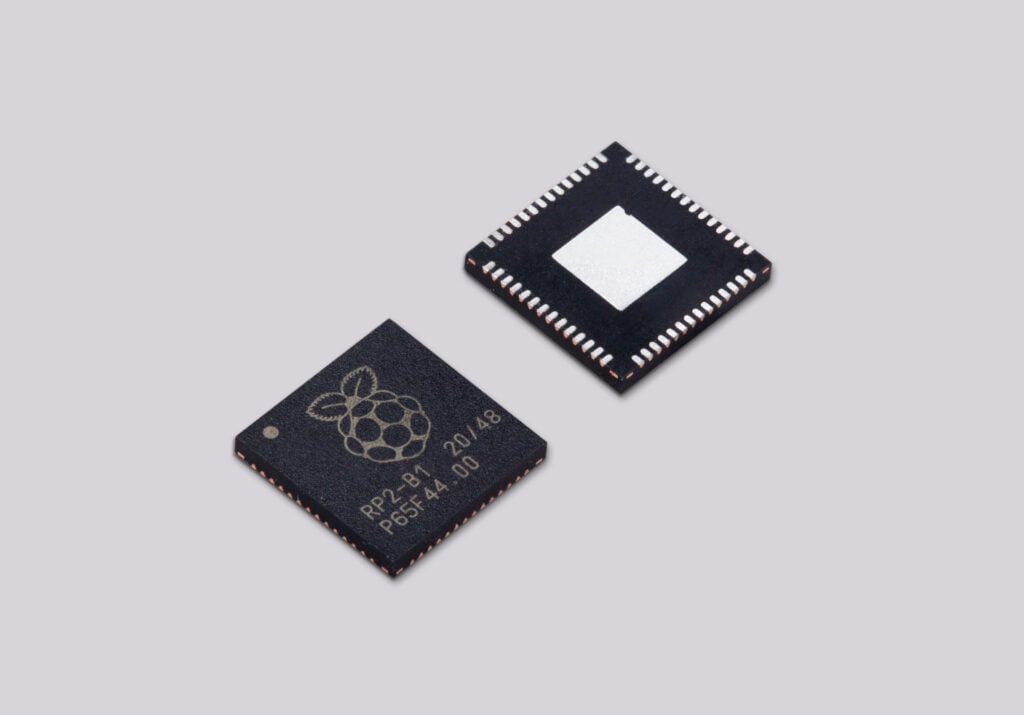
Our inaugural episode takes a close look at Raspberry Pi’s next-generation microcontroller, RP2350. Paul Sherry and Chris Boross from our commercial team walk us through Raspberry Pi’s second franchise, our silicon products, and in particular the RP2350 chip that succeeded RP2040.

Wait, Raspberry Pi designs its own silicon?

Raspberry Pi is probably still best known for our single-board computers and modules, but for over half a decade we’ve been a chip developer too. That journey began when we couldn’t find an off-the-shelf microcontroller that hit the right price and performance for our earliest Raspberry Pi Pico products. We built one of the most talented in-house ASIC teams in the business and designed RP2040 with the aim of using it just for our own products, but other companies soon took an interest. Fast forward to 2025 and we found ourselves, for the first time, selling more microcontrollers over the year than “big” (well, relatively speaking), board-level products like SBCs.

What changed between RP2040 and RP2350?

RP2040 launched in 2021, sold millions of units, and, perhaps most valuably, generated loads of customer feedback. Three areas claimed our attention: a lack of super robust security features, which worried some of our commercial customers, together with a demand for more CPU and memory headroom as well as more I/O. We listened and designed RP2350 – secure, powerful, and peripheral-rich – specifically to address this feedback.

A major focus was keeping the new product affordable, at a “disruptive” price point, if you will, and this was probably the biggest ask for our chip architects. RP2350 retails in reels at around 80 cents per unit, only 10 cents more than RP2040, despite roughly doubling the compute on offer.

Chris and Paul get into all the details in the podcast; thank you to the hosts of our first episode! By way of a super tease to encourage you to listen, here’s one of our favourite bits: Chris and Paul call the RISC-V cores in RP2350 “a love letter to CPU enthusiasts,” giving the community a low-cost way to experiment with the architecture. What’s not to [nerdily] love?

Watch and subscribe

Subscribe to the Raspberry Pi Podcast on Spotify, Amazon, or Apple podcasts. We’ll also be releasing each episode on our YouTube channel, where you can watch for free. (Here’s a handy RSS feed for those asking!)

For those who prefer to see the bodies attached the the voices they’re listening to

Request a podcast topic and Ask Us Anything!

What would you like to listen to next? Leave us a comment requesting a topic and we’ll try to lure the appropriate Pi Towers-dweller behind the microphone for you.

If you’re a Redditor, our upcoming AMA might be worth a look. You can ask our CEO Eben Upton and our CTOs Gordon Hollingworth and James Adams [almost] anything this Thursday 21 May from 3pm UK time until about 5pm, or whenever the comments descend into people telling Eben how much he looks like Jason Statham. Then we will stop.

The post Welcome to the Raspberry Pi Podcast appeared first on Raspberry Pi.


from News - Raspberry Pi https://ift.tt/qcBCpzH
Labels: ,

Monday, May 18, 2026

OVCS: Raspberry Pi–powered electric car

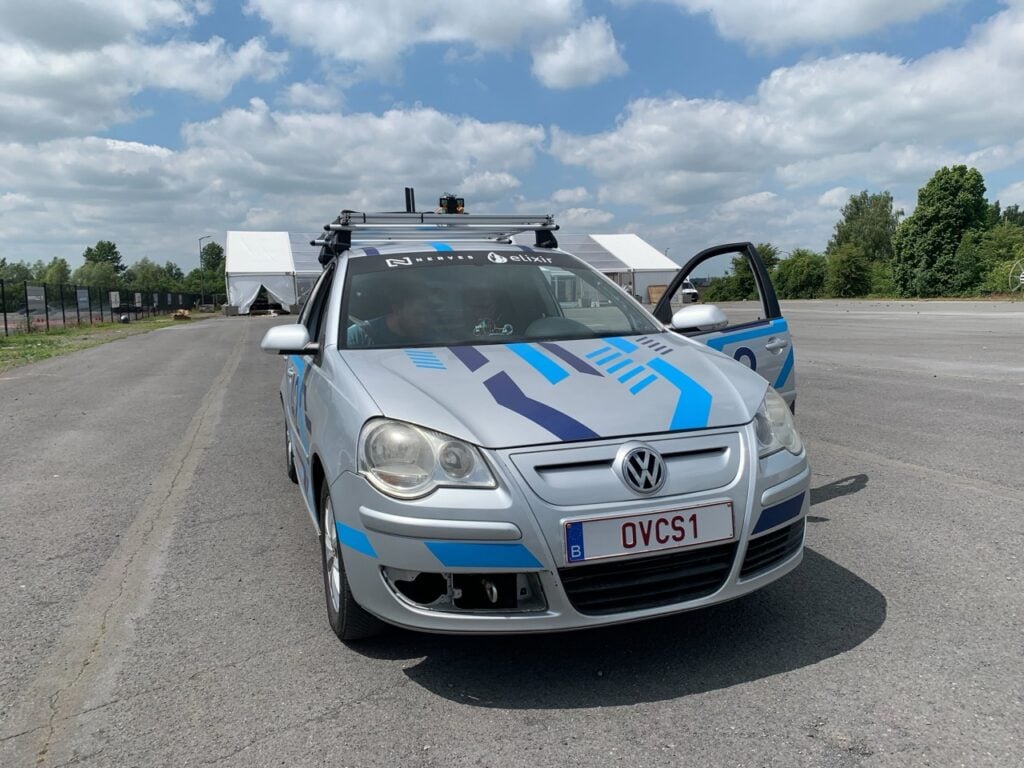
This Maker Monday, we’ve gone big with this Raspberry Pi–powered electric ‘Frankencar’ made up of parts from different vendors. The OVCS (Open Vehicle Control System) team converted an old VW Polo into an electric vehicle that can be driven remotely.

And kids, adults, all of the above, I cannot stress this enough — DO NOT TRY THIS AT HOME.

The electric vehicle (EV) revolution is just about here. With EV charging points found nearly everywhere, and more established car manufacturers introducing electric variants of existing models — or entirely new ones — a petrol-free future seems closer than ever. Of course, as a reader of this blog, you will be aware of how technology companies can be, and won’t be surprised to know that these manufacturers are using a lot of proprietary tech in their vehicles.

The vehicle is currently not road-legal

“Our project, OVCS [Open Vehicle Control System], aims at breaking the traditional vendor lock-in that you see in cars and other vehicles,” Marc Lainez tells us. “We want to make it possible to interface parts from different brands together as if they were always meant to be working that way. Most car parts have a universal functionality to perform (braking, steering, showing data…), but the language they speak is different. So we thought we could build such a platform that would allow tinkerers like us to extend or swap a vehicle’s functionalities with parts from any brands.”

Marc and his team have developed a prototype of this platform, which uses Raspberry Pi to translate between the different parts.

Cross-compatible

The team had been looking for a larger-scale hobby project they could sink their teeth into, one that would combine all of their various interests. EVs ended up sitting at the centre of the Venn diagram.

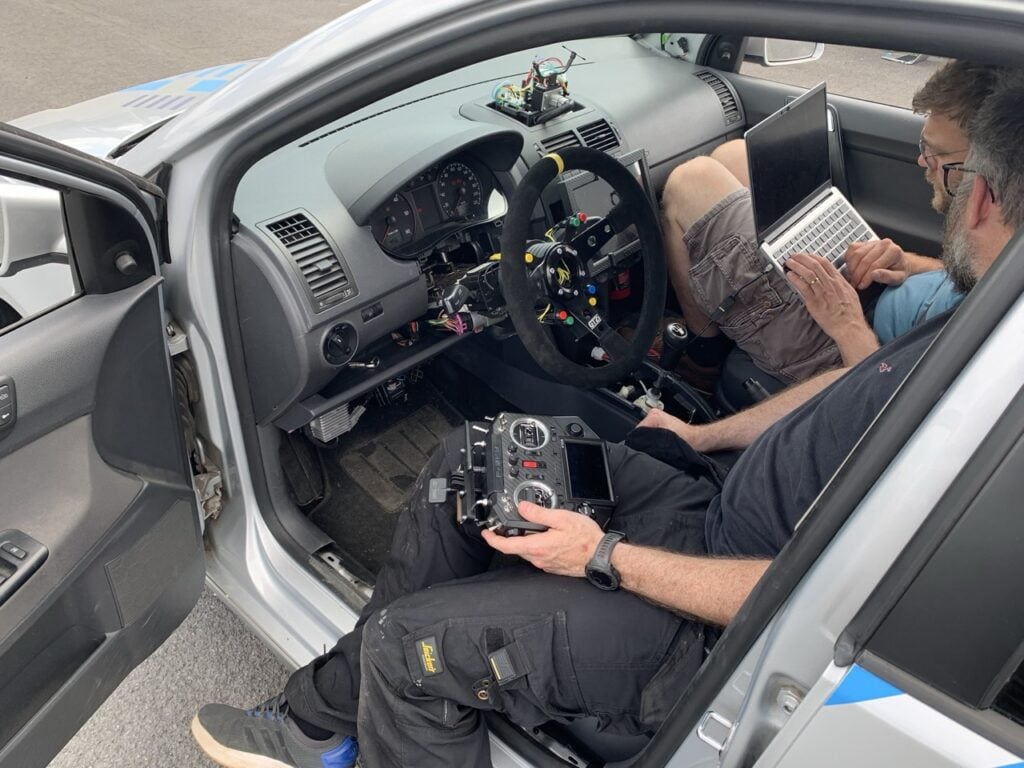
A custom steering column was used, so why not attach a very serious racing wheel?

“[We] were growing concerned with the security and reliability of vehicle software platforms,” Marc says. “We thought this was the perfect project to learn a ton about how car parts communicate, how they interact together, and how we could seamlessly integrate parts together using modern languages on off-the-shelf hardware components like Raspberry Pi.”

Raspberry Pi is used in multiple ways in the concept car: first, to power the vehicle management system, which they describe as the brains of the platform.

“It translates messages from the different communication buses (CAN) and routes them to the appropriate ones,” Marc explains. “In total, we have five CAN networks that are being accessed through SPI modules connected to a Raspberry Pi. Without this Raspberry Pi, the car wouldn’t be driveable.”

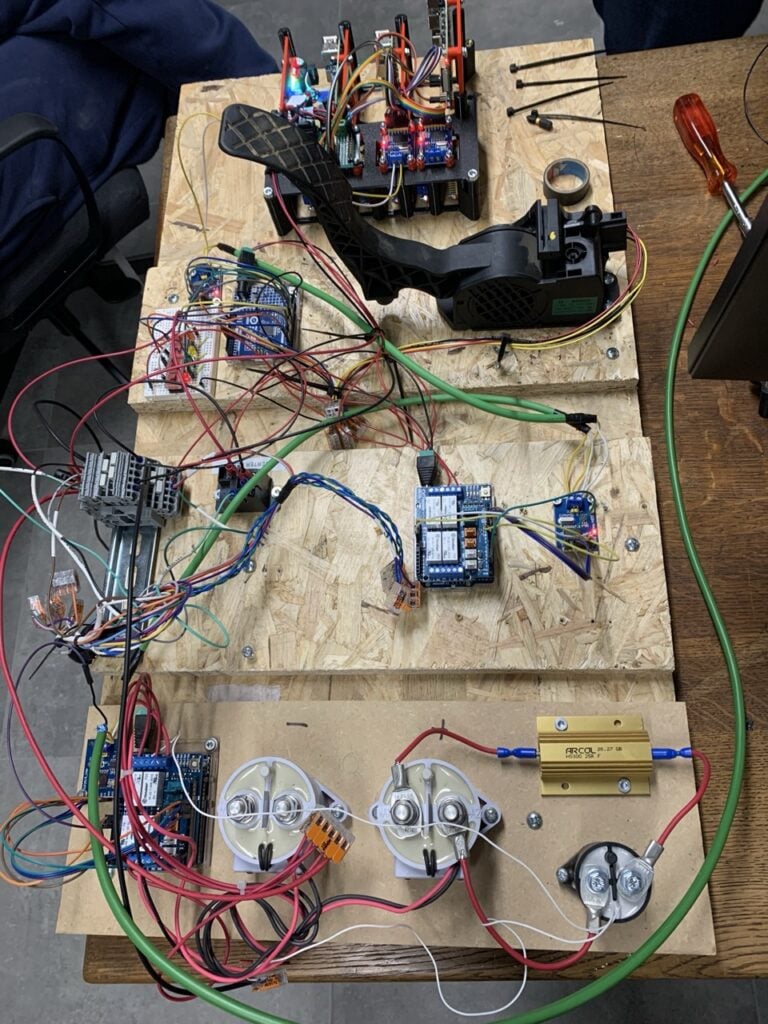
The prototype was built on wood before any modifications to a real car happened

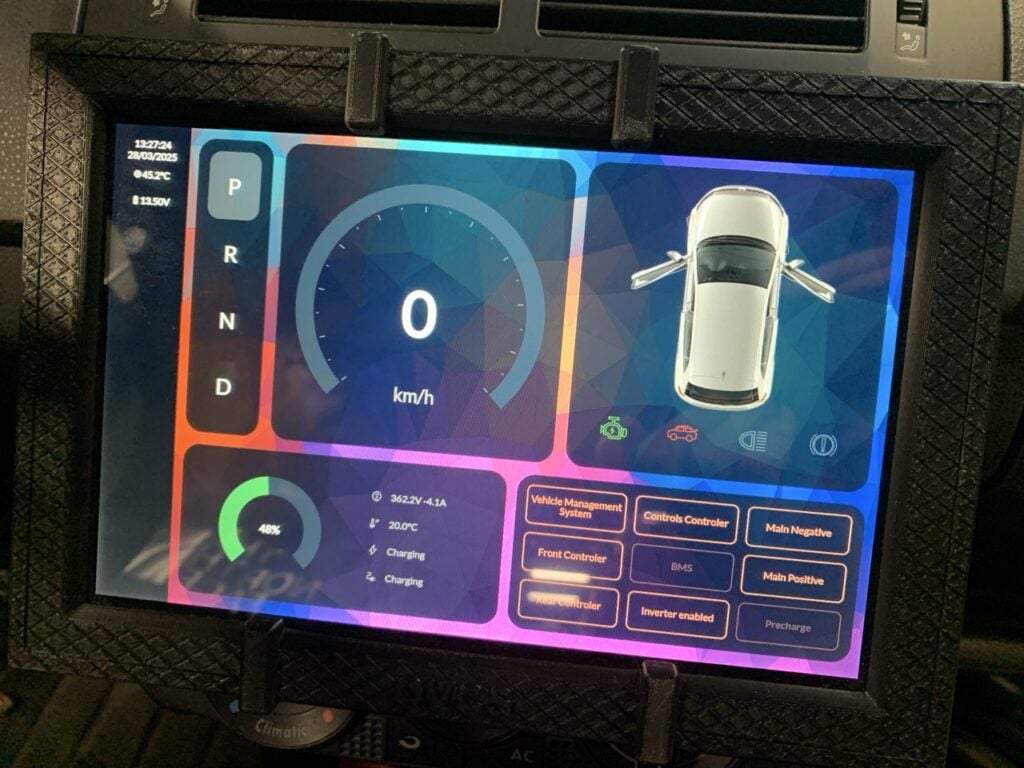
It’s also used in the infotainment system — something we’ve seen several folks do with Raspberry Pi in cars before. Not only does it show all of the usual info about your vehicle, but it also includes a touchscreen automatic gear shift, as the car is an EV conversion.

Finally, there’s the radio bridge: “[It’s] a component connected to the CAN bus and sends instructions to the VMS to accelerate, brake, and steer,” Marc says. With it, they can control the car remotely.

“From a software perspective, we wanted to have a technology stack that was familiar and at the same time, something ‘batteries-included’ that would allow us to easily build firmware in a high-level language while at the same time making the firmware updates really easy,” Marc continues. “Since we had done quite a lot of Elixir development, we used Nerves. This is an IoT framework built in Elixir and Erlang that relies on Buildroot (Linux build system) and gives you the ability to write your firmware in plain Elixir, a high-level functional language. It made our development cycles much faster/shorter and easier and allowed us to use a language we were already familiar with.”

Put it in reverse

Getting the various parts to communicate — such as a Nissan Leaf electric motor and parts from a VW Polo — was one of the hardest elements, as manufacturers generally do not publish documentation on how their components communicate.

The infotainment system, also powered by a Raspberry Pi, has a touchscreen gear selector

“We had to reverse-engineer quite a lot of messages in order to make the car functional,” Marc reveals. “To give an example, if you want to know what message gives you the handbrake status (pulled or not), you look at all that is passing on the bus, you pull the handbrake a few times to see what frame is perfectly synchronised with your action to isolate its ID, then you check which bytes change when you pull it… For more complex components, this is a combination of multiple messages and, fortunately, there is a community of car tinkerers who publish their findings on forums online. Sometimes the work was done; sometimes partially and we had to complete it.”

Over the course of 18 months, the team did manage to make their ‘Frankencar’ driveable, which was their main goal — they then went beyond that by making it remote-controlled. They also wanted to document their build, which they’re in the process of completing. After that? “The next goal is for the car to be self-driving,” Marc says.

Issue 165 of Raspberry Pi Official Magazine is out now!

If you liked this article, there are many more like it in the latest issue of Raspberry Pi Official Magazine. You can purchase a copy from the Raspberry Pi Store in Cambridge. It’s also available from our online store, which ships around the world. And you can get a digital version via our app on Android or iOS.

You can also subscribe to the print version of our magazine. Not only do we deliver worldwide, but those who sign up for a six- or twelve-month print subscription will receive a FREE Raspberry Pi Pico 2 W!

The post OVCS: Raspberry Pi–powered electric car appeared first on Raspberry Pi.


from News - Raspberry Pi https://ift.tt/q6FM2am
Labels: ,

Friday, May 15, 2026

Powering coexistence: how Raspberry Pi technology is helping WWF protect wildlife and communities in Pakistan

WWF-Pakistan recently got in touch to tell us about the work they and the Lahore University of Management Sciences have been doing to mitigate human–wildlife conflict in the Gilgit-Baltistan mountains. Using Raspberry Pi 4 to power a specially trained AI detection and alert algorithm, the team is helping local communities protect their livestock without damaging the region’s ecosystem.

High in the snow-clad mountains of Gilgit-Baltistan, Pakistan, life is defined by extremes. Bare, rocky ridges stretch across a harsh landscape where communities depend heavily on livestock for survival. In this same terrain lives one of the world’s most elusive predators — the snow leopard.

For local communities, the snow leopard is both a symbol of pride and a source of risk. As natural prey declines and habitats shift under the pressures of climate change and expanding human settlement, livestock depredation has become the primary driver of human–wildlife conflict. In a single predation event, as many as 60–70 animals can be lost — a devastating economic blow for families whose livelihoods depend on their herds.

To address this escalating challenge, WWF-Pakistan partnered with the National Center of Robotics and Automation at the Lahore University of Management Sciences (LUMS) to develop and deploy an AI-powered Predator Early Warning System. At the heart of this innovation lies Raspberry Pi 4.

Conservation at the edge

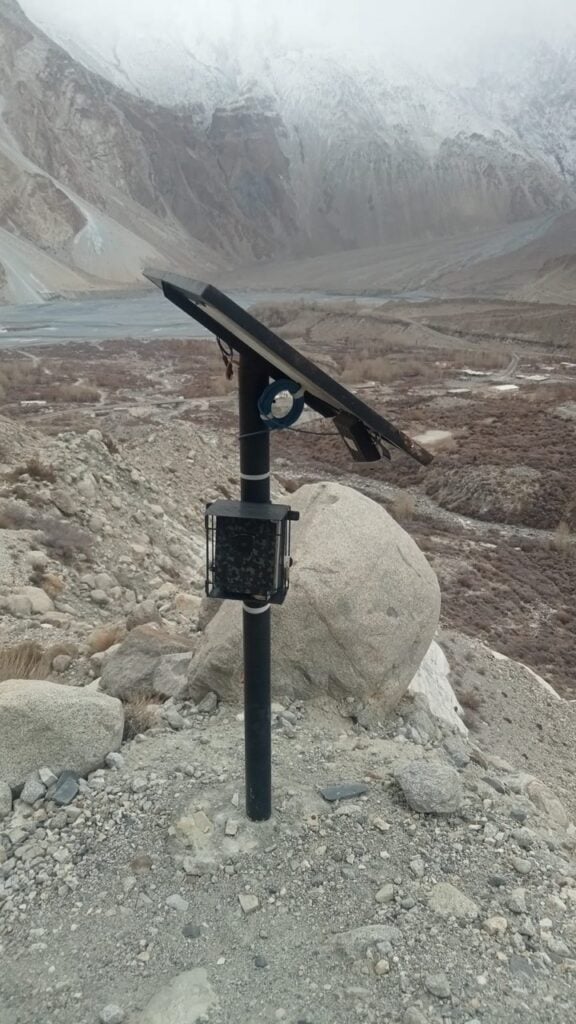
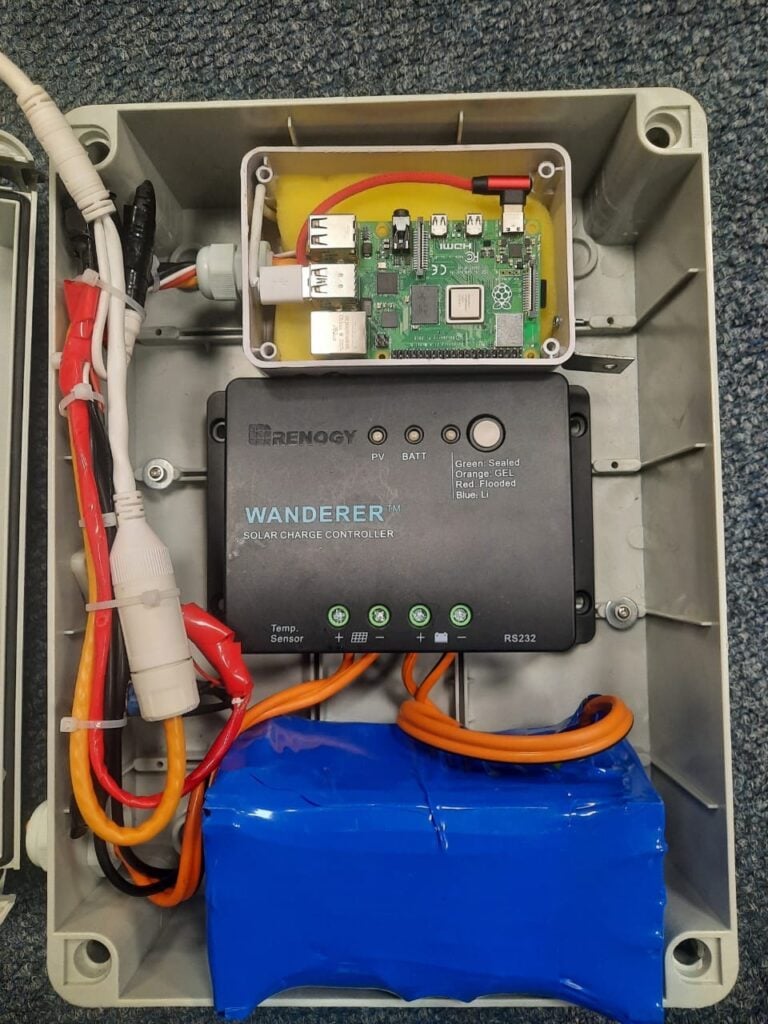
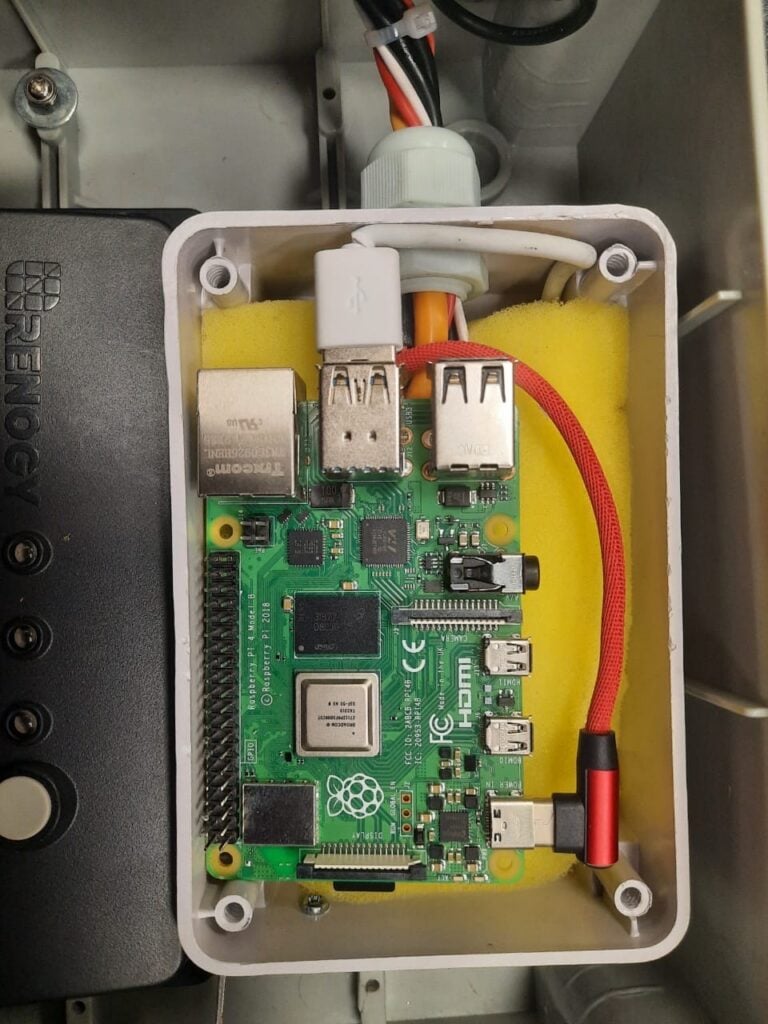
Since 2022, solar-powered camera traps built around Raspberry Pi 4 single-board computers have been strategically installed in high-risk zones near human settlements. Well adapted for remote, high-altitude environments, the system combines durability with intelligent edge processing.

Each unit captures images of passing wildlife and transmits real-time data to a central monitoring platform through the local 4G network. A trained AI algorithm analyses incoming images to detect the presence of snow leopards and other predators, including foxes, wolves, and Himalayan lynxes.

When a predator is identified near grazing areas or livestock enclosures, the system automatically generates alerts for field teams and community members. This early warning enables villagers to secure their livestock before an attack occurs, shifting their response from reactive to preventative.

Technology that builds tolerance

The innovation of the solution lies not only in the hardware or the algorithm, but in its impact on community perception. By reducing economic losses, the Raspberry Pi 4–powered system is helping to break the cycle of fear and retaliation that often defines human–wildlife conflict.

Communities are no longer forced to choose between protecting their livelihoods or protecting the region’s wildlife. Instead, they are equipped with information that allows them to do both. This has resulted in a measurable attitude shift, with locals going from viewing the snow leopard solely as a threat to recognising its ecological importance for maintaining healthy mountain ecosystems.

The current model has proven both scalable and adaptable. With support from the Forest, Wildlife and Environment Department of Gilgit-Baltistan, there are plans to expand the system to additional high-conflict areas across the region. The next phase will be for WWF and LUMS to look at how to deter predators from attacking livestock altogether.

A blueprint for coexistence

This initiative has demonstrated how affordable, flexible computing platforms like Raspberry Pi can power real-world conservation in some of the planet’s most challenging environments. By combining edge computing, AI, solar energy, and mobile connectivity, WWF-Pakistan and its partners are showing that technology can do more than monitor wildlife — it can enable coexistence.

The post Powering coexistence: how Raspberry Pi technology is helping WWF protect wildlife and communities in Pakistan appeared first on Raspberry Pi.


from News - Raspberry Pi https://ift.tt/p15e2X8
Labels: ,

Wednesday, May 13, 2026

Search our documentation by meaning, not keywords

Raspberry Pi is always looking for new and better ways to do things. One of the most significant ways in which AI has affected the internet is the proliferation of chatbots and answer generators, and while we’ll never use AI to author our documentation, we’re curious to find out whether tools like these could help users find technical information easier and quicker.

Something you may have heard about is retrieval-augmented generation (RAG for short), which uses a defined set of documentation to answer questions for you in an informed way. In this blog, we are trialling two different RAG-based documentation tools: InKeep and Kapa. Our website is serving two versions of today’s post to visitors at random; if you reload the page, you’ll get the other tool. Why not ask this one a question about something you’d like to do on a Raspberry Pi and see how it responds?

We’d love you to think about whether the tool did a decent job of answering your question — give the response a thumbs up or a thumbs down and get ready to tell us anything else you want us to bear in mind when you get to the comments section. We take our documentation very seriously, and your thoughts and opinions will help us augment and improve it.

So what's special about this?

The chatbots are actually using Raspberry Pi documentation, including the html, the white papers and books stored in pip.raspberrypi.com, and some specific GitHub repositories that have documentation built into them (for example, rpi-image-gen). Because of this, it can search within the documentation for specifically relevant chunks of information to feed into the AI model. It can then ask the model your question, and the model will decide whether it actually has relevant information and generate an answer if it feels it does.

How does it work? Isn't it just a fancy search engine?

When LLMs ingest something, it's first converted into tokens. You can think of a token as a thing that represents a single word, although most tokens represent sub-words ('running' might be broken up into 'run-' and '-ning', for example). The next stage is to convert those tokens into 'embeddings'. Embeddings are actually vectors in a very high-dimensional space (up to a thousand different dimensions), and these vectors represent the "semantic meaning" of the token. Two vectors that are close in value have a similar meaning. Here's the canonical example:

The diagram above shows an example displayed in three dimensions (because we can't even visualise what four spacial dimensions would look like). You could think of the dimensions as terms like 'gender', 'royalty', and '80s music reviews'! If you take the embedding for 'woman' and subtract the embedding for 'man', you get a vector that roughly means "the shift from male to female". Add that same shift to 'king', and you land very close to 'queen'.

This isn't a party trick. It tells you something genuinely useful: nearby coordinates in this space mean similar things, and the same kind of relationship between pairs of words shows up as the same kind of geometric shift. The model has learnt, from billions of words of training data, that the relationship between 'king' and 'queen' is about the same as the one between 'man' and 'woman', and it has encoded that where the points sit.

An extension of this concept is to develop embedding models that can take a sequence of tokens (like a paragraph of, say, 100 words) and create an embedding (vector) from it that gives the semantic meaning of the section of text. This is the type of embedding model used in RAG-based systems, as we want them to find chunks of text that have similar meanings.

Chunking

Once you notice this property, it's fairly clear what to do with it. Take all your documentation, chop it into reasonably sized chunks — a paragraph or two each — and generate an embedding for every chunk. You now have a database in which similar meanings are close together. 

When someone asks a question, the system generates an embedding for that question and goes looking through the database for the embeddings that sit closest to it. The closest ones are, by construction, the chunks of documentation whose meaning is most similar to the question. You haven't had to guess the author's vocabulary; the model has done that work for you.

Finally, generation

At this point, the system has a list of the most relevant bits of documentation. It could just display them to the user as is — and plenty of search systems do stop there — but it can go one step further: it can hand those chunks, along with the original question, to a language model and ask it to write an answer using only those chunks.

That's the 'generation' half of 'retrieval-augmented generation'. The retrieval step finds the right documentation, and the generation step turns it into a tidy, plain-English answer. The model isn't drawing on whatever it happens to remember from the training data, which is where language models tend to get themselves into trouble; it's giving an answer from your actual documentation and nothing else. If the answer isn't there, the tool will state that, rather than making something up.

Opinions, please

Please have a go and give us feedback on what you found; convenient thumbs-up and -down buttons are included in the chat interface. That information, along with the interaction, will be stored in the system so that we can determine what works and what doesn't.

We will never use AI to create documentation in the first place. Instead, we are hoping to use these tools to help inform us where our documentation has gaps or errors; we put a lot of effort into creating it, and we want it to be as accurate, complete, and straightforward to use as possible. Our documentation team and I are excited to scrutinise the results to discover what they reveal about your needs and how effectively we serve the information you want.

The post Search our documentation by meaning, not keywords appeared first on Raspberry Pi.


from News - Raspberry Pi https://ift.tt/jyGfLTB
Labels: ,

Monday, May 11, 2026

Maker Monday: Some of the best RP2350-based boards

This Maker Monday, Phil King shares some of the newer RP2350-based boards that have come to market since we last looked at similar devices back in issue 148 of Raspberry Pi Official Magazine. Just like before, these examples demonstrate the flexibility and versatility of our microcontrollers.

The RP2350 microcontroller is the brains of Raspberry Pi Pico 2, along with a host of third-party boards. RP2350 features dual Arm Cortex-M33 processors running at 150MHz, 520KB of on-chip SRAM, and twelve PIO state machines. So, compared with the RP2040 microcontroller from the original Raspberry Pi Pico, it offers a major performance boost for handling more complex computational tasks. It’s no wonder it’s been used in such a wide range of third-party boards and devices — you can check out the full selection in the Powered by Raspberry Pi product catalogue.

We’ll be taking a look at a few of the most interesting ones here, equipped with a variety of special features such as battery power inputs, extra GPIO pins and connectors, motor/servo controllers, Ethernet ports, IMUs, and even mini LCD touchscreens.

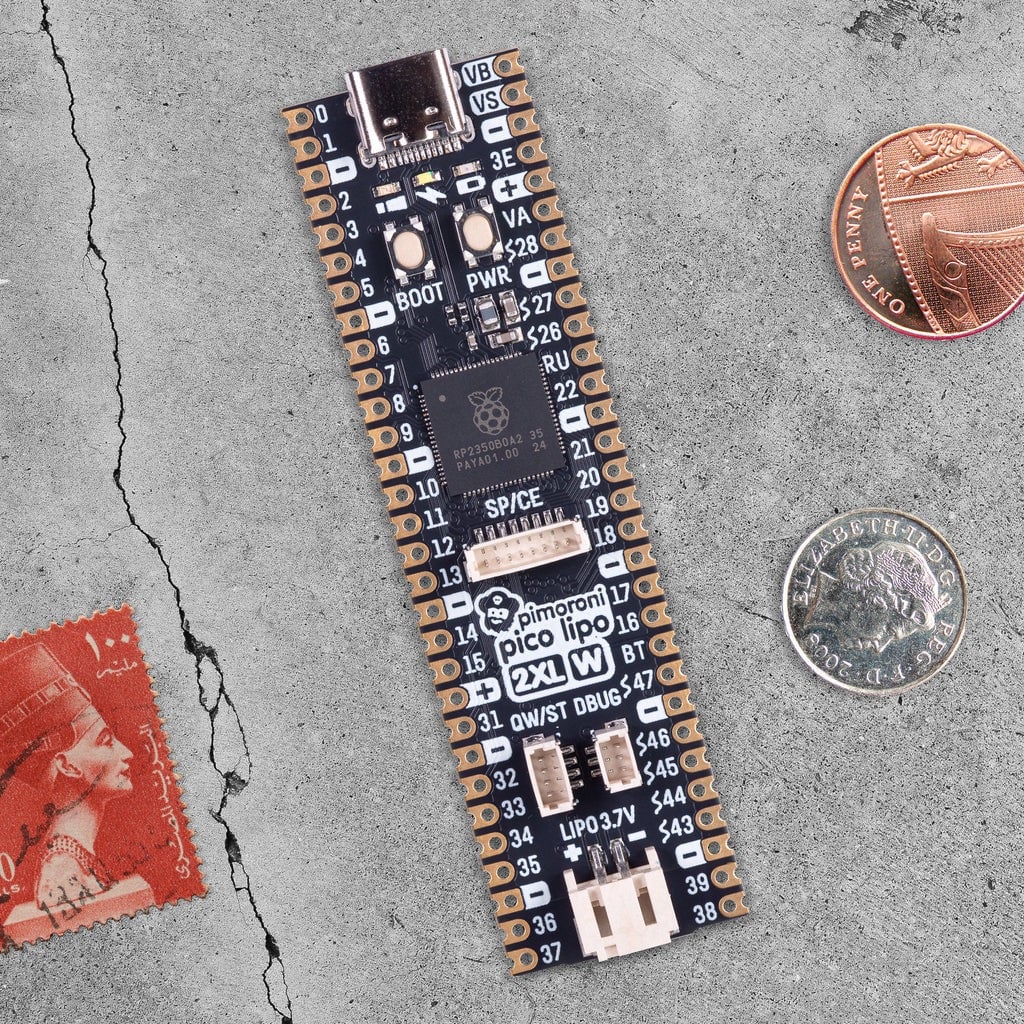
Pico LiPo 2 XL W

Pimoroni | £21 / $23

Did you know that there are actually two main versions of the RP2350 microcontroller chip? There’s the standard RP2350A used in Raspberry Pi Pico 2 and many third-party boards, and RP2350B, which adds 20 more pin connections — including 16 extra GPIO pins and five more ADC channels.

Pimoroni’s Pico LiPo 2 XL W makes full use of RP2350B with an elongated board that breaks out those 20 extra pins. Helpfully, the rest of the pinout is the same as the standard Raspberry Pi Pico one, and all the (unpopulated) pins are labelled on the top of the board, so it’s easy to find the ones you need. Memory and storage have also been super-sized, with 8MB of RAM and 16MB of flash.

A USB-C connector is used for power and programming. You can also power the board from a LiPo or Li-ion battery (not supplied) via a two-pin JST connector; there’s on-board battery management and charging circuitry.

Other features include connectors for Qwiic and STEMMA QT, debug, and SP/CE (SPI/serial), along with boot/user and power buttons. A Raspberry Pi Radio Module 2 provides Wi-Fi and Bluetooth connectivity. 

Verdict

Extra GPIOs, battery input/charging, and much more.

Inventor 2350 W

Pimoroni | £35 / $38

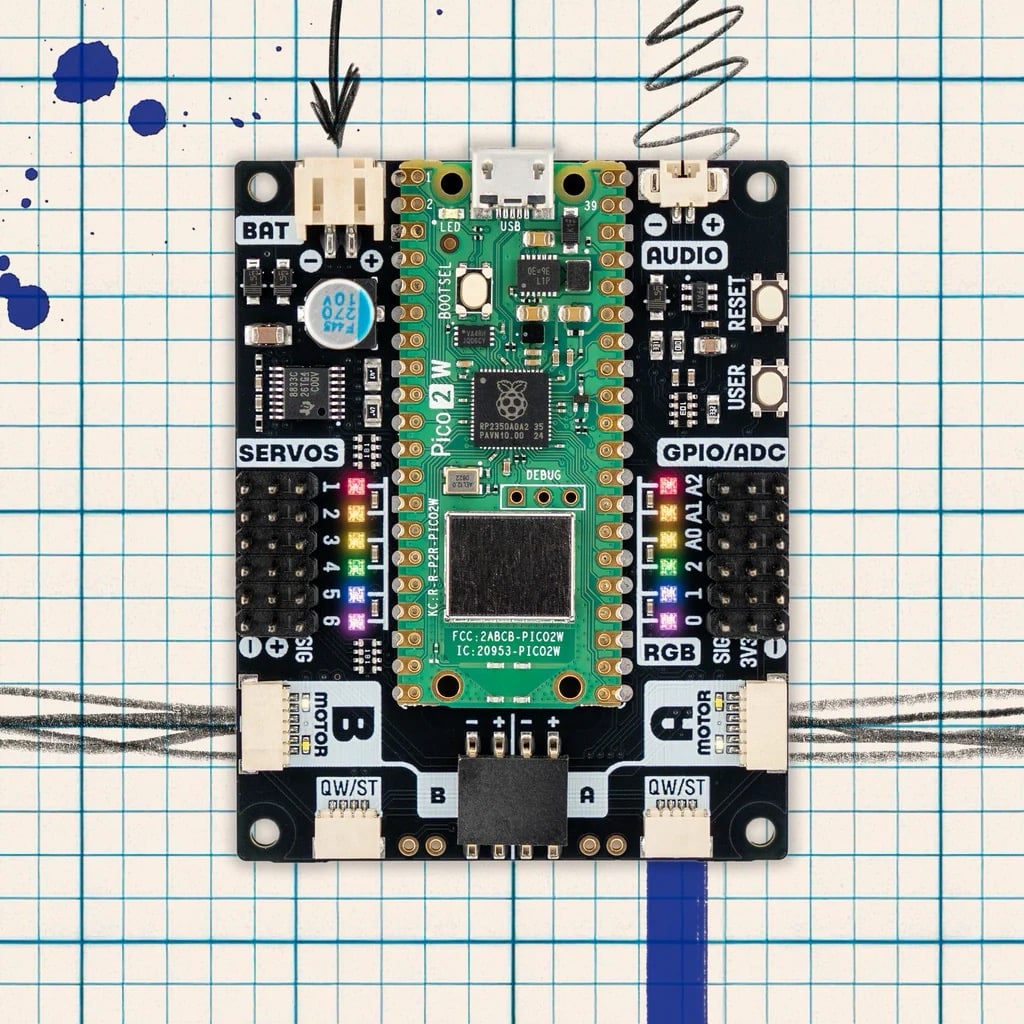
With myriad connections and extra features, this versatile board makes it easier for beginners to get started with coding and electronics. It’s powered by a standard Raspberry Pi Pico 2 W (with built-in wireless connectivity) soldered to the top of the board, surrounded by ports, pins, NeoPixels, and buttons — an identical layout to that of the excellent Inventor 2040 W it supersedes.

For robotics, there are headers for up to six servos, along with an on-board motor driver connected to two JST-SH ports. The latter are for connecting encoder-equipped motors, but you can still wire standard ones up to a four-pin connector.

There are also six GPIO headers (including three analogue inputs), two Qwiic/STEMMA QT ports (for sensors), an I2C/Breakout Garden unpopulated header, a JST-PH input for optional battery power, a two-pin connector for 1A at 1.5W audio output, plus handy ‘User’ and ‘Reset’ buttons. Phew!

Software-wise, the Inventor 2350 W is easy to use, thanks to comprehensive libraries and code examples for MicroPython and C/C++.

Verdict

A feature-packed board, ideal for electronics and robotics.

RP2350 1.43-inch AMOLED Round Display Dev Board

Waveshare / The Pi Hut | £23 / $31

Most Pico-style boards lack any form of display, though you can buy add-ons to enable video output. Waveshare, however, produces a range of RP2350-based devices with built-in displays in various shapes and sizes.

This particular model is circular and comes with an optional metal case with cut-outs for the boot and reset buttons, USB-C port, microSD card slot (for extra storage), I2C and UART four-pin headers, and GPIO breakouts on the rear.

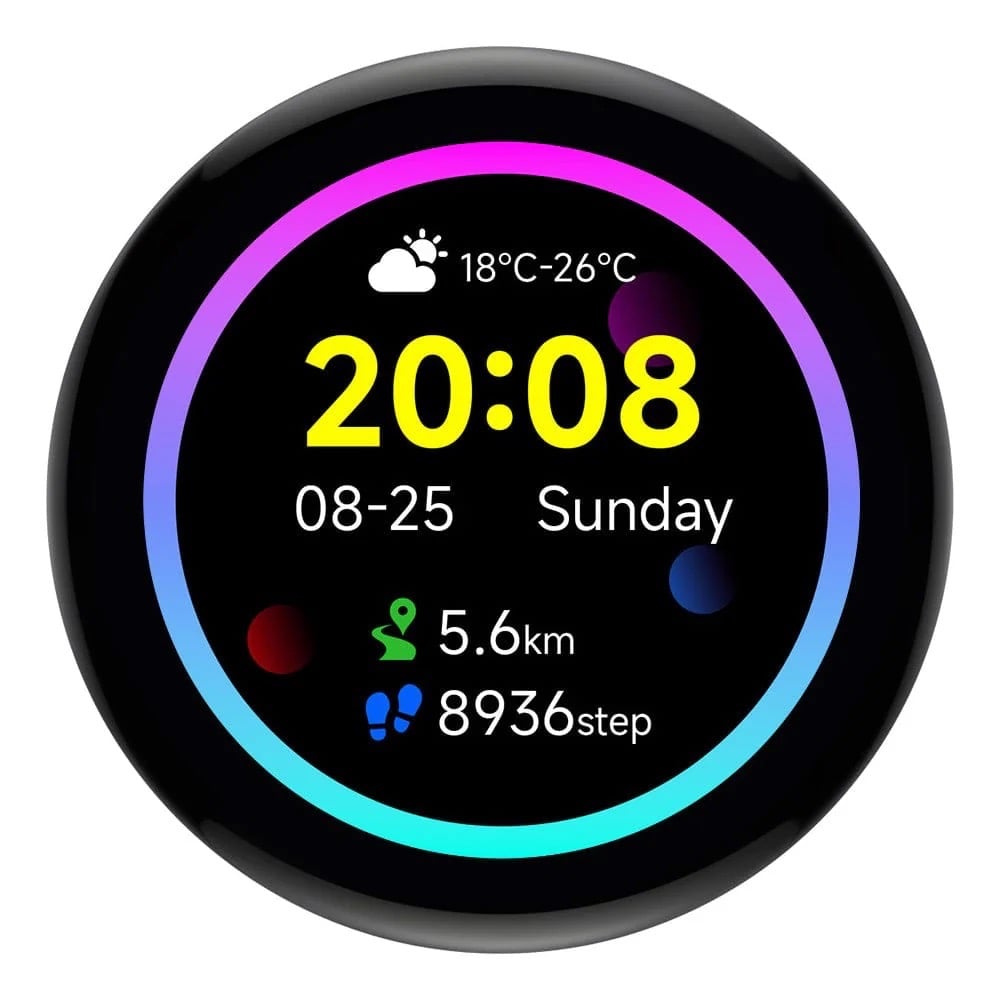
With a 466 × 466 pixel resolution, the colour AMOLED screen looks vibrant and has capacitive touch. Combined with the built-in six-axis IMU and an RTC with a battery header, it could easily be used for a wearable or pocket project like a fitness tracker.

While the MicroPython firmware is limited to a handful of code examples, the C/C++ firmware is far more comprehensive, including the use of LVGL (Light and Versatile Graphics Library) to render text, images, and an example GUI complete with animated graphs and a tiny pop-up keyboard.

Verdict

A very slick RP2350-based touch display with a built-in IMU.

Plasma 2350 W

Pimoroni | £17 / $18

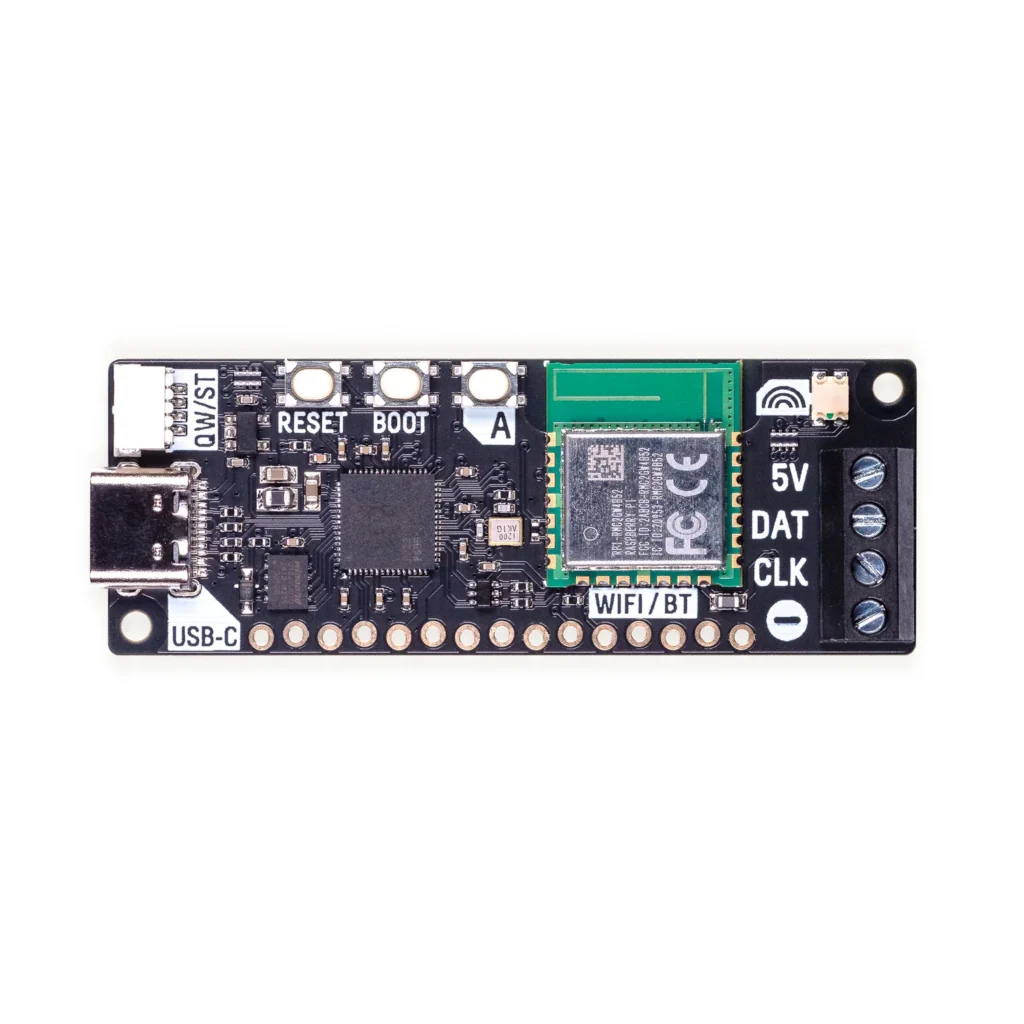
We reviewed the original Plasma 2350 back in issue 148, and now there’s a version with built-in wireless connectivity, opening up extra possibilities for controlling a connected strip of WS2812/NeoPixel or APA102/DotStar RGB LEDs. The optional starter kit includes a 10m string of 66 frosted LED stars.

It’s dead easy to get started. Just connect your LED string’s three or four wires to the board’s screw terminals, then use its USB-C port to access the MicroPython firmware, library, and numerous code examples on a computer. Impressive effects include falling snowflakes, alternating/random blinks, sparkles, fire, pulsing, and a sweeping rainbow. More can be found in some community resources, including an impressive demo with 77 effects.

To give the board access to your wireless network, you’ll need to add your Wi-Fi details to a secrets.py file. You can then try out web-based examples, such as setting the colour of the LEDs via the CheerLights IoT system on social media, or running a lighting effect that responds to the weather from Open-Meteo.

Verdict

An easy and fun way to control a string of addressable LEDs.

Tiny 2350

Pimoroni | £8 / $9

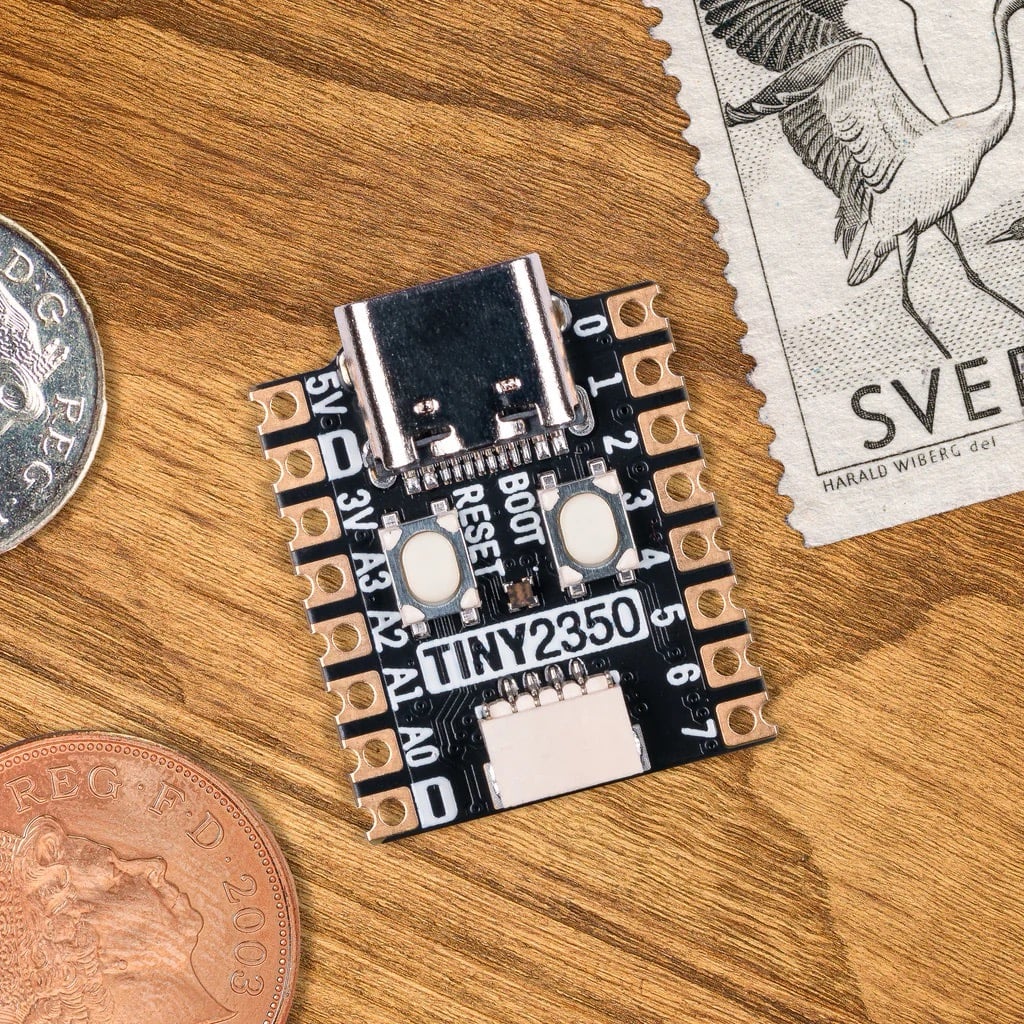
If you need a really small RP2350-based board for a project where space is very limited, the Tiny 2350 is ideal. Measuring a mere 22.9 × 18mm, it really is tiny — around the same size as a standard UK postage stamp.

Along with a boot select button, the board crams in a handy reset button, RGB LED, and 4MB of QSPI flash storage, though there’s no wireless connectivity. A USB-C port is used to power the board, and to connect it to a computer for firmware installation and coding in MicroPython, CircuitPython, or C/C++.

The Tiny 2350 is available with or without pre-soldered pin headers. One obvious downside is that the number of pins is reduced compared to a standard Raspberry Pi Pico 2. There are 16 in total, including 12 GPIOs (plus another couple on the Qwiic/STEMMA QT port). They include four 12-bit ADC channels, though, and encompass two channels each of the I2C, SPI, and UART protocols.

Verdict

A teeny-tiny RP2350 board that’s ideal for smaller projects.

W6300-EVB-Pico2

WIZnet / The Pi Hut | £11 / $15

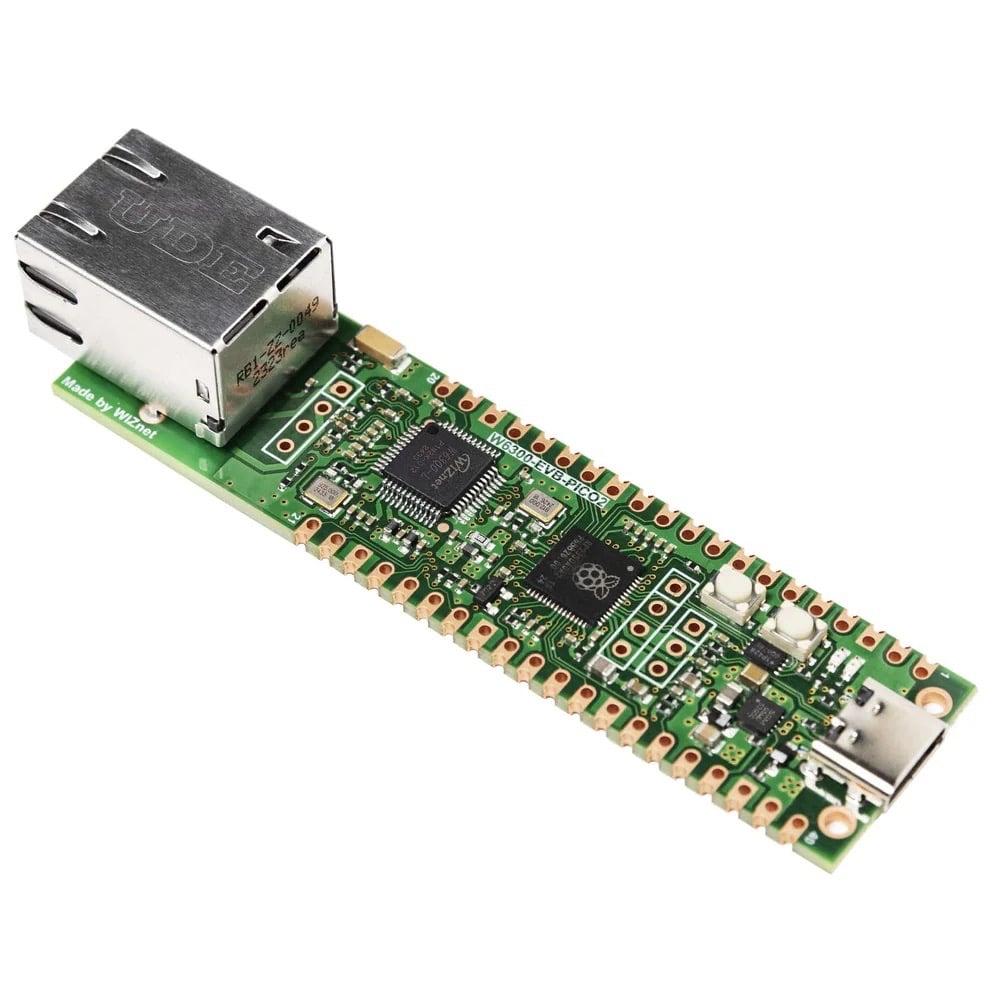
While many RP2350-based boards boast built-in wireless connectivity, sometimes you may need a wired Ethernet connection for improved reliability, security, and speed. Possible projects include a low-power HTTP web server, network monitoring, IoT data logging, and industrial devices.

WIZnet produces an Ethernet HAT to use with standard Raspberry Pi Pico boards. Alternatively, you can use one of the firm’s range of Ethernet-equipped RP2040 and RP2350 devices. This RP2350 one is based around WIZnet’s own W6300 chip: a 10/100 Ethernet controller with a hardwired TCP/IP stack that supports both IPv4 and IPv6 — as do the W6100 models, while the W5500-based boards are limited to IPv4.

All of them feature an identical pinout to Raspberry Pi Pico and Pico 2, with 40 pins and 26 multi-purpose GPIOs, so it’s all very familiar. The documentation includes C/C++ firmware/code examples for Ethernet, FreeRTOS, AWS, Azure, and chip performance. There’s no MicroPython firmware available for the RP2350 models yet (unlike the RP2040 ones); hopefully that will come soon.

Verdict

Perfect for projects requiring a wired network connection.

The post Maker Monday: Some of the best RP2350-based boards appeared first on Raspberry Pi.


from News - Raspberry Pi https://ift.tt/y0XFT94

Labels: ,

Wednesday, May 6, 2026

Raspberry Pi Connect: Device tags, required 2FA, and a mobile keyboard

Raspberry Pi Connect lets you access your Raspberry Pi devices remotely from anywhere, straight from a web browser. Since we last wrote about Connect, we’ve shipped three updates that we think will make it noticeably more useful — particularly for the growing number of teams using Connect for Organisations to manage fleets of devices.

Tag and filter your devices

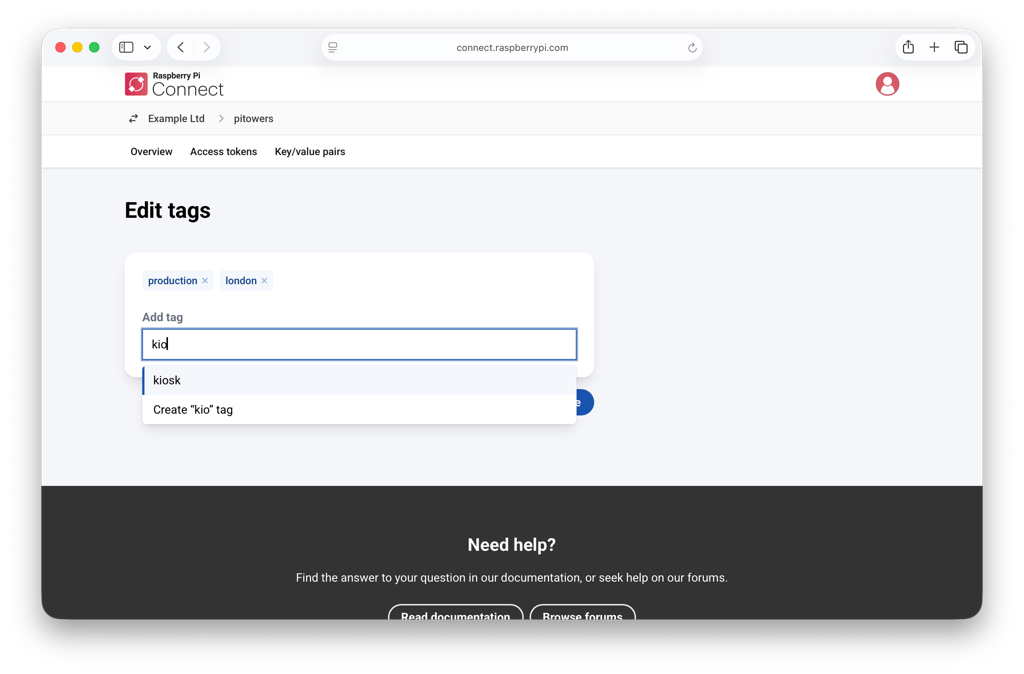
The Edit tags dialog, showing applied tags and the autocomplete dropdown with suggestions.

Once you have more than a handful of Raspberry Pi devices in an organisation, finding the right one quickly starts to matter. With these new updates, you can now apply tags to any device — for example, by location (london, cambridge), by environment (production, staging), or by what the device actually does (point-of-sale, kiosk). Tags appear underneath the device name on both the device page and the device list, and any administrator can add or remove them from the device’s Settings page, or when first linking a device to your account.

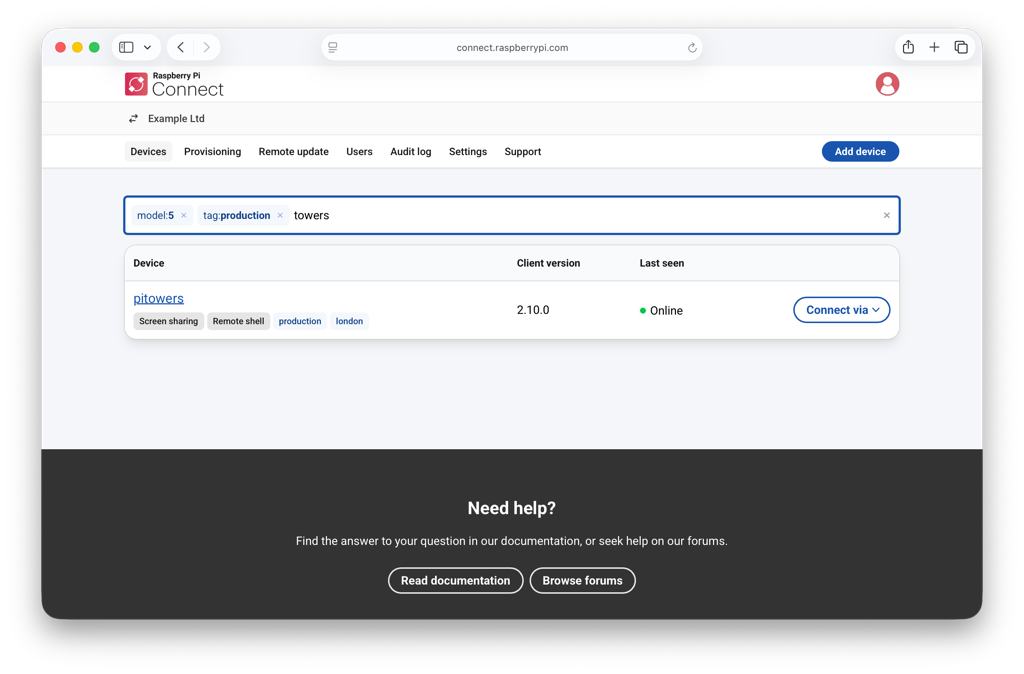
The device list with model and tag filters applied in the search bar.

The search bar at the top of the device list now combines free-text search with structured filters. Type a qualifier followed by a colon — model:5, memory:4gb, os:raspios-13, or tag:production — and Connect will narrow the list as you type. You can even stack filters in a single query: model:5 tag:production dashboard will find every Raspberry Pi 5 tagged with production that has “dashboard” in its name. Selecting any tag in the device list adds it to your search instantly.

Tags are also exposed through the Management API, meaning you can apply them when you create an authentication key during provisioning — handy if you’re scripting the roll-out of a new batch of devices.

Require two-factor authentication for your organisation

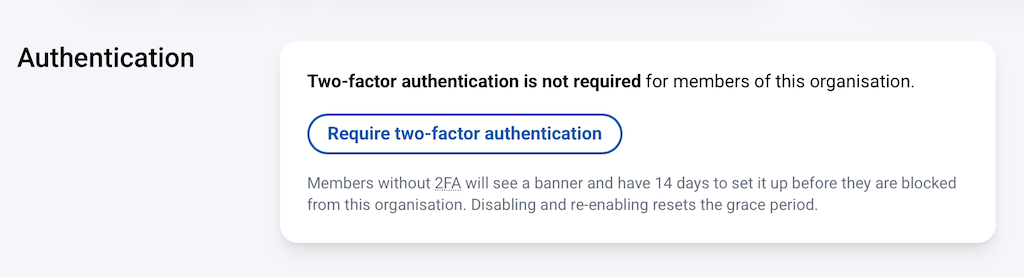
The Authentication section of the Connect organisation settings, showing the Require two-factor authentication button.

Connect for Organisations now lets administrators require all members to use two-factor authentication (2FA) on their Raspberry Pi ID. It’s a single switch in the new Authentication section of the organisation’s Settings tab, and it adds a meaningful layer of protection against compromised member accounts being used to reach your devices.

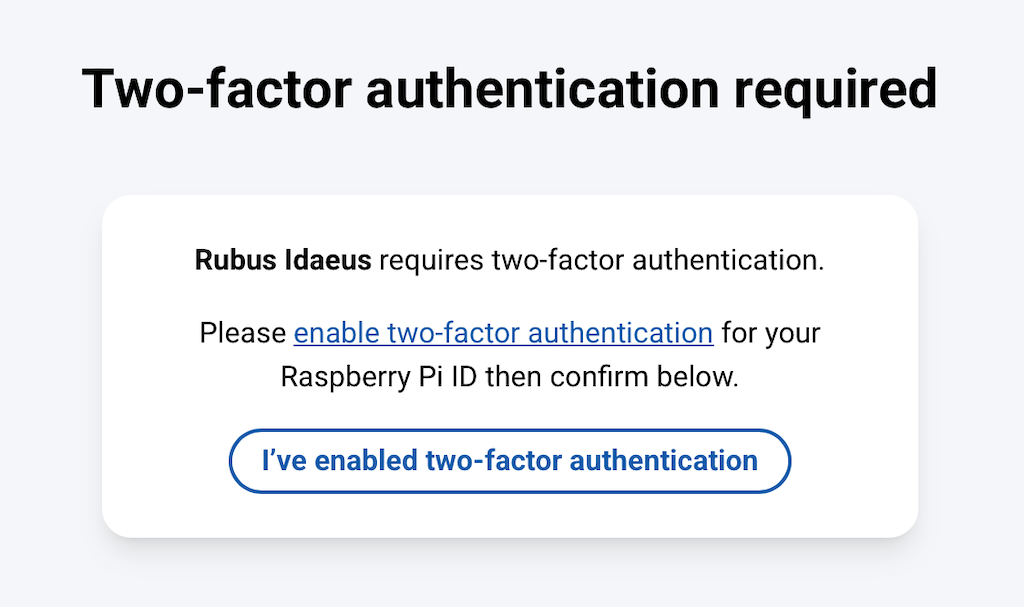
Turning it on starts a 14-day grace period. During that window, members without 2FA see a banner showing how long they have left and a link to enable it on their Raspberry Pi ID; everyone else carries on as normal. When the grace period ends, any member still without 2FA is blocked from the organisation until they enable it. They won’t be able to access devices or other organisation resources in the meantime.

The Two-factor authentication required page shown to members without 2FA after the grace period ends.

If you ever want to relax the requirement, you can turn off 2FA in your organisation settings. (Disabling and re-enabling 2FA resets the grace period, so you can give members another two weeks if you need to.)

Use a mobile keyboard while screen sharing

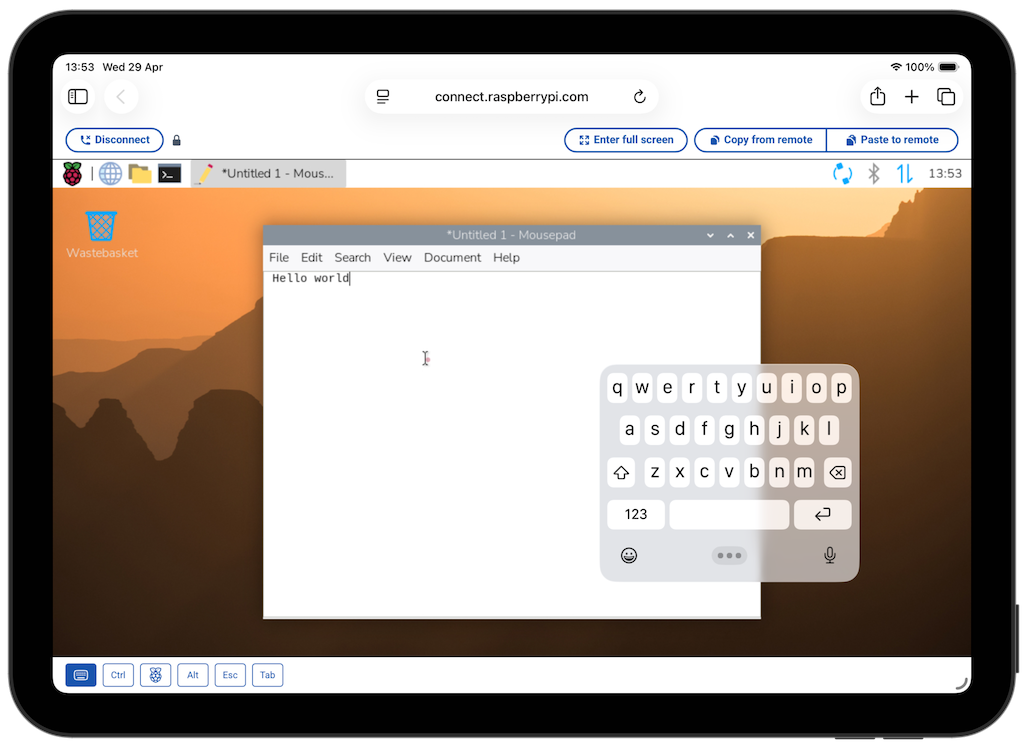
Connect’s screen-sharing interface works on phones and tablets as well as desktops, but typing on a touch device was previously only possible if you attached a physical keyboard. The screen-sharing toolbar now includes a dedicated Keyboard toggle alongside the existing buttons for Ctrl, Alt, Esc, and Tab, allowing you to use an on-screen keyboard on mobile devices without any extra hardware attached.

Try it out

Connect is free for personal use. Connect for Organisations comes with a four-week free trial, after which you’re billed monthly in arrears for the peak number of registered devices. You can find full instructions for tagging and filtering devices, enabling 2FA, and everything else in the Raspberry Pi Connect documentation, or sign in at connect.raspberrypi.com to get started.

The post Raspberry Pi Connect: Device tags, required 2FA, and a mobile keyboard appeared first on Raspberry Pi.


from News - Raspberry Pi https://ift.tt/gJm1F3D

Labels: ,

Monday, May 19, 2025

Extreme Raspberry Pi: projects taking Raspberry Pi to its very limits

Raspberry Pi is a very powerful, very small, very customisable device, and we have seen it be used for so many things over the years because of this. Whether folks are slipping them into 3D-printed classic console cases or simply hiding them away as home file servers, we’ve covered many of the cool things the community has done with Raspberry Pi.

Which begs the question — how can you push the limits with a Raspberry Pi? Well, with 13 years of projects and Raspberry Pi models, you’ll be surprised just how far/fast/high/deep Raspberry Pi has gone. We’re taking Raspberry Pi to the extreme.

Longest-running Raspberry Pi

2331 days of uptime for the Model B that could

This Raspberry Pi has been running for ten years,” says Reddit user KerazyPete, although not without a few reboots. At the time of posting in late 2023, his Raspberry Pi 1 Model B (revision 0002 with 256MB of RAM no less, one of the first production versions) had been ‘up’ for 2331 consecutive days — since July 2017.

The system in question; the original Raspberry Pi 1 design is quite nostalgic

It’s the longest uptime we’ve seen for a Raspberry Pi — in fact, it’s pretty impressive given the occasional power cut, power surge, or accidental unplug. Our file servers and media centres have undergone hardware upgrades as well.

You can easily check how long your Raspberry Pi has been running by opening a terminal and typing uprecords — maybe you’ll be surprised. We do recommend upgrading the operating system on your Raspberry Pi whenever a new OS gets released, though; the security updates can be very important.

Highest Raspberry Pi

GASPACS 428 km over the Earth

Is it cheating to go to space so your Raspberry Pi can claim the computer’s altitude record? Not when there are several Raspberry Pis in space! The current highest Raspberry Pis in space are the Astro Pi boxes up on the International Space Station. However, GASPACS beat their record by a mere six kilometres on its 117-day mission in 2022.

A successful mission photo

The GASPACS (Get Away Special Passive Attitude Control Satellite) was a 1U CubeSat built by students at Utah State University to test aerobraking with an inflatable ‘AeroBoom’. Since the Earth is not a perfect sphere, the CubeSat’s orbital altitude was 416 km (258 miles) at its perigee and 428 km (267 miles) at its apogee.

During the dawn of Raspberry Pi, and for many years afterwards, high-altitude balloonist Dave Akerman would regularly send balloons about 40 km into the mesophere (which is above the stratosphere, Queen fans) with a Raspberry Pi attached to take photos and do other telemetry. In 2016, he broke the world record for the highest live image sent down from an amateur balloon (below), at 41,837 metres. That probably makes it the highest a Raspberry Pi has gone without the use of a rocket.

Fastest Raspberry Pi

AstroPi — 17,100 mph is easier with no friction

While the Astro Pi units on the ISS don’t hold the altitude record for a Raspberry Pi, due to the peculiarities of orbital physics, they are the fastest. Very basically, having a lower orbit means you need to go faster so that you don’t fall to Earth.

The ISS is clocked at 17,100 mph (27,520 km/h) — that’s 4.77 miles per second (7.67 km/s), and 22.5 times the speed of sound at ground level. Those numbers are difficult to conceptualise, but it orbits the Earth in just shy of 93 minutes, meaning it orbits 15.5 times a day. Pretty quick!

The first pair of Astro Pi went up for Tim Peake’s mission

The Astro Pi units in orbit have various sensors thanks to the Sense HAT, including motion sensors, which schoolchildren use to run experiments via code. Unlike GASPACS, these Raspberry Pi are specially hardened to spend an extended period of time in space.

Deepest Raspberry Pi

Maka Niu sitting 1500 m underwater — possibly able to do 6000 m — is no mean feat

Going deep underwater is hard. The deeper you go, the more the weight of the water above you becomes a huge issue, and human-made devices need to be able to withstand immense pressure in the depths. That’s why your watch may only be rated to 100 m underwater — go any deeper, and stuff will start to break.

A descent of 1500 metres — nearly a mile underwater — is very, very far. At this depth in salt water, pressure is 148 atmospheres, or 148 times the normal air pressure at sea level.

Maka Niu is a very special system then, able to safely contain a Raspberry Pi Zero and Raspberry Pi Camera Module 2 in a low-cost device — opening up citizen science to more folks, and helping to explore the largely unknown deep sea.

Highest clock speed

Reaching a limit of 3.6GHz

‘Fastest Raspberry Pi’ can really mean two things, which is why we’ve awkwardly titled this ‘highest clock speed’. Every new-numbered model of Raspberry Pi is slightly faster than the last, but the question for some people is: how fast?

It works, but it’s not very practical — it’s just a test after all

Overclocking computer hardware — telling it to run faster than it was designed to, i.e. increasing its clock speed — is an age-old tradition amongst tech nerds. The caveat is that this tends to make the hardware hotter and can damage it in the long run. In normal overclock scenarios, this is solved with liquid cooling or other cooling solutions, but if you want to take a chip to its absolute limits, you need something really cold: liquid nitrogen.

With a specialised tube over a Raspberry Pi 5, Pieter-Jan Plaisier poured liquid nitrogen directly onto the chip as it ran at 3.6GHz. Can it go higher? Supposedly not — at 3.7 GHz, the system crashed, and not because of the heat.

Hottest Raspberry Pi?

What is the hottest environment a Raspberry Pi operates in? Unfortunately, we couldn’t find an answer, but some have operated in deserts that regularly clock 40°C (104°F). The real trick here is that, with good enough cooling, you can have a Raspberry Pi operate in environments with very high temperature; the BCM2712 chip that runs Raspberry Pi will operate at temperatures as high as 80–85°C (176–185°F) before throttling is enabled.

Coldest Raspberry Pi

Arribada Penguin Monitoring — it gets to −60°C in the Antarctic winters

Sending any equipment to Antarctica is tricky: it gets very, very cold there. When your tech accidentally stays there for three years and remains working, that is quite the feat. The Arribada Penguin Monitoring project (accidentally) managed that; the team was unable to pick up the camera at the end of 2019 and then, well, the world shut down in 2020, at the start of the Covid-19 pandemic.

While the temperature regularly falls below −30°C (−22°F), it can reach −60°C (−76°F) in the winter. Antarctica is very large though, and depending on the placement of the camera, the temperature will be different. Having said that, after three years in the frigid wasteland, the Arribada camera returned home safely with 32,764 photos for the researchers to go through.

Raspberry Pi operating temperatures

Compute Module 4 recently got an extended temperature variant, giving it an even lower operating temperature of −40°C (−40°F). Many parts of the world, not just Antarctica, can get to below −20°C (−4°F), which is the standard lowest operating range of other Raspberry Pi products. 85°C/185°F is the highest operating temperature of Raspberry Pi.

Largest Raspberry Pi

There are a few huge, working Raspberry Pis. A 10× Raspberry Pi 3 was shown off at Maker Faire Bay Area in 2016, and Raspberry Pi’s own Toby Roberts built a 6× Raspberry Pi 4 for a little exhibition in the shopping centre where the official Raspberry Pi Store resides. This 12× working Raspberry Pi takes the crown, though, designed and 3D-printed by Zach Hipps.

Raspberry Pi 3; human being for scale

The PCB is made from plywood, the GPIO pins are made from aluminium tubing, and over 5 kg of PLA filament was used for the other large-scale components. “I connected my Raspberry Pi to all the large-scale connectors with extension cables,” Zach told us when we spoke to him a few years ago. “I plugged in a monitor and keyboard, and everything fired right up!”

Smallest Raspberry Pi

While some tiny RP2040/RP2350 boards are technically the smallest Raspberry Pi products, the smallest standard Raspberry Pi computer is Raspberry Pi Zero. However, you can make it smaller still — 5 mm smaller as it goes. Raspberry Pi Zero v1.3 has a camera connector which can be removed, and with no circuits in that section of the board, you can trim it. Check out this forum post about it.

The post Extreme Raspberry Pi: projects taking Raspberry Pi to its very limits appeared first on Raspberry Pi.


from News - Raspberry Pi https://ift.tt/btKzWo2

Labels: ,

Friday, May 16, 2025

Build a Raspberry Pi setup for children aged 3 to 6

In the latest issue of Raspberry Pi Official Magazine, we invited Dr Andrew Lewis, a specialist fabricator and maker, to explain why, in a world where we are immersed in technology, there are still some young people who struggle to use a desktop computer. Here, he also explains how you can help break that trend by introducing the next generation to skills they might build their future careers on.

In the modern world, desktop computers are increasingly rare. Laptop computers, mobile phones, and tablet computers with touchscreens are ubiquitous, while the traditional mouse and keyboard are less easily discovered. Learning to type and use a computer is a valuable skill for kids, but you can’t just sit a young child in front of a laptop or desktop computer and let them play unsupervised. Aside from the obvious security issues, a desktop computer is not designed with the needs of small children in mind. This article covers some of the issues you will encounter if you decide to make a real computer for a young human, and offers some potential solutions.

It seems strange, but in a world where we are immersed in technology, there are still some young people who struggle to use a desktop computer simply because they’ve never been exposed to a physical keyboard and mouse

In the context of this article, when we talk about ‘young children’ or ‘small children’, it mostly means children around the ages of three to six. Unlike in a Bethesda game, children in the real world are all different, and what’s appropriate for one child might not be appropriate for another. It’s up to parents to decide what is or isn’t safe or appropriate for their own children.

A small computer like Raspberry Pi 500 is ideal for older children to learn with, but for young children (around four years old), there are certain factors that make rolling your own machine from a Raspberry Pi a more attractive solution. So what exactly are the issues you should consider when thinking about making a computer for younger children, and what sort of machine are we looking to build?

Firstly, little hands are very good at pulling cables they’re not supposed to, and delicate plugs and sockets like USB cables are likely to get pulled out. Securing these plugs using cable ties and sticky pads will go a long way towards keeping the machine running. The same goes for SD cards, which small fingers are very adept at removing if they are accessible enough. The most sensible way to deal with this is to hide everything inside a box of some description; whether that’s a pre-made project case or a custom 3D-printed enclosure that supports the monitor is up to you.

A static address

Making a computer that’s too large to be easily portable is a great way to prevent unwanted access and enforce a schedule. With a small tablet or smartphone, a child can walk away from you into a different room or position the screen so that it’s difficult for you to see what they’re doing. A desktop computer does exactly what its name suggests — it sits on a desktop. It provides a fixed location where your child can sit down and use the computer. If you ever took typing classes, you’ll know that posture and position are important when using a keyboard.

One of the biggest advantages to using a Raspberry Pi 5 over a Raspberry Pi 500 for younger children is that you are not tied to using the stock keyboard. Young children are more familiar with lower-case letters and usually have less fine motor control than adults; the small keys and upper-case lettering on traditional keyboards can be confusing to some children. Additionally, it’s very common for children to be long-sighted. It makes sense if you think about it, since a child has smaller eyes than an adult. The eye simply isn’t developed enough, and the lens focuses light behind the retina instead of directly on it. This means that while they might be able to see a monitor or projector screen in a classroom, objects closer to them, like keyboards or books, are more difficult to focus on. A purpose-built children’s keyboard with a large font and larger keys takes care of this issue, and can be swapped out for a regular keyboard as the child grows.

A colourful keyboard designed for children can be educational even when it isn’t plugged in — the colours on this keyboard help to differentiate between vowels, consonants, numbers, and control keys; the larger keys and text are also easier to read, making it easier to type without mistakes

A standard computer mouse is far too big for a small child to use comfortably, so it doesn’t take much thought to solve that problem: use a smaller mouse instead. However, learning to use a mouse properly takes time, and until they master the skill, children are likely to get frustrated every time they use the computer. For this reason, it helps to have a computer monitor with a touchscreen matrix. If they are struggling to do something on the computer using the mouse, they can just touch the screen and then carry on using the mouse when they are more confident. In that case, you don’t want to give the child a giant monitor unless you want them to get a sore neck and arms. Although young people these days no longer sit in front of a glass vacuum tube with an electron gun firing at their faces, a large monitor can still be overwhelming and uncomfortable for a child to use. 

The idea that less is more is carried through from the monitor to the speakers. Ideally, you’ll have a monitor with a small set of built-in speakers. If not, a very cheap set of Bluetooth speakers will do fine. When it comes to children, you really don’t want them to be louder than necessary. 

With all these considerations in mind, you should be able to assemble a suitable Raspberry Pi setup for a child to use. The last practical consideration is to hide every plug, socket, and cable as much as possible, in a way that is still attractive to the child. 3D-printed covers for the monitor sockets and stands to make a portable monitor look like a desktop monitor go a long way towards achieving this.

Some children may have never seen a real-life desktop computer, but they’ve probably seen them on TV or in books. They’ll expect their computer to look like the representations they’ve seen, and might be a bit confused or disappointed if it doesn’t. A great way to engage them with the computer is to let them decorate the outside with stickers and choose their own desktop background. If you’re designing a custom 3D-printed case, it’s worth adding plenty of flat surfaces for them to get creative and decorate.

Control the internet

You don’t want to unleash your child onto a completely open computer, so let’s deal with some of the big software and networking issues. At the fundamental level, young children do not need access to the internet at all. Preventing access to the internet can be done in several ways; the easiest is to provide no access to networking. No Wi-Fi passwords, no cable connections. This is a 100% guaranteed way to prevent children from accessing something they shouldn’t. A 2 m ‘air gap’ leaks no data.

There are of course other methods of limiting access to the internet, such as changing to a child-safe DNS like the OpenDNS Family Shield, or using a Pi-hole or Squid proxy in your home network. The sad reality is that filtering technology is not a perfect replacement for parental supervision, and you’ll never be able to shield a child completely from the shadier side of the web without a Faraday cage. However, if you are set on providing some internet access to young children, then a combination of these technologies, as well as close supervision, education, and logging, are about as effective as you will ever get. If your four-year-old is secretly an elite member of an underground hacking community, your results may vary. 

GCompris is an excellent educational package for children — however, the current Raspberry Pi installer has a missing dependency file, which breaks some of the games; make sure you install qt5-image-formats-plugins separately, or some of the games will be hopelessly broken and have missing graphics

The safer air gap approach doesn’t necessarily mean starving your children of knowledge or access to everything the web has to offer. Some people forget that the internet is relatively new, and for all the streaming content it provides, there are generally offline methods for presenting the same information. For example, the Kiwix project provides a way to view websites offline. There’s a whole list of pre-packaged sites to install, including Wikipedia, Vikidia (a children’s encyclopaedia), children’s story books, and even curated collections aimed specifically at children. If you can’t find what you need in the Kiwix library, there are tools to package your own sites. There’s also nothing to prevent you from augmenting the static information on their computer with DVD, CD, MP3, or streaming content provided from your own tablet or mobile phone. In fact, the distinction that “this is your computer for working, this is a tablet/TV for watching videos” can be a useful one for younger children, stopping them from becoming fixated on a specific device.

The ever-popular Tuxpaint is an excellent application for young people to experiment with, for multiple reasons. It’s a fun drawing app that helps teach fine motor and mouse control, but it also has a huge selection of buttons and menus to navigate through. Once your child starts clicking through the dozens of options and exploring the painting application, any fear of exploring other apps on the computer will diminish. In fact, Raspberry Pi itself is part of this idea. Let your child loose on the operating system. The worst they will do is break it, and with a Raspberry Pi and a backup SD card, it’s only a few minutes’ work to get things up and running again. You could create a new user and lock down the desktop to only the items you want your child to access, but because a Raspberry Pi can be reinstalled very quickly, it might be less effort to keep a backup SD card ready and let them break things.

The post Build a Raspberry Pi setup for children aged 3 to 6 appeared first on Raspberry Pi.


from News - Raspberry Pi https://ift.tt/oje5AIF

Labels: ,

Thursday, May 15, 2025

Raspberry Pi and SECO: Clea software for IIoT available natively in Raspberry Pi OS

Raspberry Pi and SECO continue to lead innovation in Industrial IoT (IIoT) through a partnership that brings together Raspberry Pi’s powerful, flexible computing platforms with SECO’s expertise in edge computing and HMI (Human-Machine Interface) solutions. As part of our ongoing commitment to supporting industrial customers, SECO’s Clea software is now available natively in Raspberry Pi OS, making it simpler to build and maintain IIoT applications.

Clea now easily available on Raspberry Pi OS

SECO’s Clea software is a comprehensive suite for managing and deploying edge applications, and it’s available natively in the latest version of Raspberry Pi OS. This streamlined integration makes it easier than ever to develop and deploy industrial applications, pairing the performance and reliability of Raspberry Pi with the advanced management capabilities of Clea.

“Industrial developers want to move fast without compromising reliability or security,” said Fausto Di Segni, SECO’s European Head of IoT and AI. “By making Clea available natively in Raspberry Pi OS, we’re removing friction from the development process and enabling a faster path to scalable, production-grade IoT solutions.”

How to install Clea

Getting started with Clea on Raspberry Pi OS is as simple as running a few commands in the terminal:

Enable Clea’s apt repo:
sudo apt update
sudo apt install -y apt-repo-clea


Install:
sudo apt update
sudo apt install -y astarte-message-hub edgehog-device-runtime
sudo apt install -y edgehog-device-runtime-forwarder

Full setup instructions are available in the Clea OS Get Started guide for Raspberry Pi.

Clea equips industrial users with robust features including remote device management, over-the-air (OTA) updates, and secure data handling, all capabilities critical to modern IIoT deployments. You’ll find comprehensive documentation from Clea to guide you through the features.

SECO’s new Compute Module 5-based HMI

In late 2024, SECO announced its Pi Vision 10.1 CM5, an HMI built on Raspberry Pi’s Compute Module 5. Designed for industrial integration in demanding environments, this robust and feature-rich new device takes advantage of the power of Compute Module 5 to to meet the needs of industrial customers for performance and longevity at scale.

With production readiness at its core, the Pi Vision 10.1 CM5 provides a seamless path from prototype to deployment, helping customers to accelerate development and simplify the transition to volume manufacturing.

The SECO Pi Vision 10.1 CM5 is a prime example of how our two companies are bringing cutting-edge solutions to the industrial market without compromising flexibility and ease of use.

A partnership focused on driving innovation

The collaboration between Raspberry Pi and SECO is built on shared goals: to lower barriers to industrial innovation and to provide scalable, secure, and versatile IIoT solutions. By combining Raspberry Pi’s accessible, high-performance computing platforms with SECO’s industrial expertise, the partnership delivers powerful, innovative and practical tools for industrial customers.

The post Raspberry Pi and SECO: Clea software for IIoT available natively in Raspberry Pi OS appeared first on Raspberry Pi.


from News - Raspberry Pi https://ift.tt/grM5m7d

Labels: ,